python crash course
a very short introduction to python
variables and data types number, boolean, string, list, dictionary
conditionals and loops if, for, while
numpy/scipy numerical/scientific computing
pandas data analysis and manipulation
matplotlib visualization
statsmodels statistical modeling
sklearn machine learning
keras/tensorflow pytorch deep learning

print("Hello world!")Hello world!
Basics
variables and data types
numbers
in python data types are implicitly declared: depending on how you write a number it may be stored as an integer or a float
# numbers

x = 1   # integer
y = 1.  # float

z = x + y

type(x), type(y), z
(int, float, 2.0)boolean
bookean variables are important cause they enable conditional statement if something is true then do something, otherwise do something else
True or FalseTrueTrue == 1 # True is actually mapped to 0, False to 1. This allows to use math to write statementsTrueTrue & False # and
False
True | False # orTrueString
# string

x = "hello world"

type(x), len(x), x[0]
(str, 11, 'h')Data types are complex objects, they can have “methods” associated to them. The methods are invoked by a ‘.’ after the variable. They are functions that are automaticallly applied to the variable that owns them. On Colab the methods availeble will show if you put a dot after a variable. (Functions are described below)
x. File "<ipython-input-9-a2885923daf8>", line 1
x.
^
SyntaxError: invalid syntax
x.split(" ")['hello', 'world']# built-in string manipulate functions
x.replace('l', 'L'), x.strip("h")('heLLo worLd', 'ello world')x.upper()strings are essentiallly lists on characters and inherit some behaviors from lists (see below)
x * 3str(1) # convert number to stringlist, tuple
lists and tuples are python native containers: you can use them to store a set of vsariables together
# list, many built-in methods
x = [1, 'b', 2]
x.append(3)
x
[1, 'b', 2, 3]x.pop(1) # remove item
x[1, 2, 3]x[2:4][3]x[-2]21 in xTrue# tuples, does not support item assignment, if you put things in tuples they are "safe" and cannot be changed
x = (1, 'b')
x(1, 'b')x[0] = 2---------------------------------------------------------------------------
TypeError Traceback (most recent call last)
<ipython-input-21-ebac946b3580> in <module>()
----> 1 x[0] = 2
TypeError: 'tuple' object does not support item assignmentdictionary
dictionaries are key-value paired containers: each element has a name by which you can retrieve it
# dictionary
dic ={'one':1, 'two':2, 'three':3}
dic.keys()dict_keys(['one', 'two', 'three'])dic['one']1# append to dict
dic['four'] = 4
dic{'four': 4, 'one': 1, 'three': 3, 'two': 2}conditionals and loops
if statement
x = 2
if x == 1:
    print("1")
else:
    print(' not 1')
not 1
x = 2

if x == 1:
    print("1")
elif x == 2:
    print("2")
elif x == 3:
    print("3")
else:
    print("others")
2
for loop
for i in range(3):
    print(i)
0
1
2
# use zip to loop over multiple variables
x = ['a', 'b', 'c', ]
y = [1, 2, 3]
for i, j in zip(x, y):
print(i, j)a 1
b 2
c 3
# use enumerate get index of each loop
x = ['a', 'b', 'c', ]
for i, xi in enumerate(x):
print(i, xi)
0 a
1 b
2 c
while loop
x = 0
while x < 3:
print(x)
x += 1
0
1
2
functions
def add(a=0, b=0):
    """
    Add two numbers
    Args:
        a: number, default 0
        b: number, default 0

    Returns:
        return the sum

    """
    result = a + b
    return result
the bit between “”" and “”" is called a “docstring” and all functions should have one to describe input, output, and puspose
add(1, 2)3classes
Creating a new class creates a new type of object, like a complex variable that has inside of itself variables and methods
class Car:
    def __init__(self,brand,**kwargs):
        self.brand = brand
        self.kwargs = kwargs

    def get_brand(self):
        return self.brand

    def get_prams(self):
        return self.kwargs
# Instantiate
newCar = Car('BMW', price=10000, color='red', model='m')
after a class is defined, an object of the class is creted by “instantiating” it, defining all required values
newCar.get_brand()
newCar.get_prams(){'color': 'red', 'model': 'm', 'price': 10000}Inheritance: a class can contain the initialization of another (parent) class
class Coupe(Car):
    def __init__(self, brand,**kwargs):
        super().__init__(brand,**kwargs) # works in phthon 3
        #super(Coupe, self).__init__(brand,**kwargs)  # works in python 2/3

    def test(self):
        print(' class works')

    def __str__(self):
        # for print
        return self.brand
# Instantiate
newCoupe = Coupe('BMW', price=10000, color='red', model='m')

newCoupe.test()
class works
newCoupe.__str__()standard library
Python comes with a standard library of modules for performing common tasks,
all built-in modules https://
interact with system
import osos.getcwd() # return the current working directory
#os.chdir() # change working dir
os.system('mkdir something') # run a terminal command0returns the code of the command https://
accessing files in your working folder
import globuseful to list files inside of the directory in which you are working (I have no files ending in “.py” here)
glob.glob("*.py")[]glob.glob("*")['today', 'something', 'sample_data']I can also access terminal command by using ! at the beginning of the line if I am working in a notebook. Here “ls” stands for list, and lists all files in this directory
!lssample_data something today
random
random variables are going to be super important for us!
packages
from numpy import random

random.choice(['apple', 'pear', 'banana'])
random.randint(0,10) #random integer between 0 and 108random.randn(2,3) # 6 numbers each a random drawin a gaussian distribution with mean 0 and standard deviation 1 organized as a 2x3 arrayarray([[ 0.19473473, 0.6750933 , -1.83021753],
[-0.31215882, -0.29824092, -0.06436665]])numpy/scipy
numpy is the core module for linear algebra and multidimensional arrays; scipy provides additional functions for scientific computing
import numpy as np
import scipy as sp
# create an array
a = np.array([1,2,3])
b = np.array([(1.5,2,3), (4,5,6)], dtype = np.float32)
c = np.random.random([3, 3])
c
array([[0.62274266, 0.37133858, 0.99875643],
[0.9585066 , 0.49238662, 0.41288253],
[0.08803071, 0.07511918, 0.76451357]])c.size, c.shape, c.ndim(9, (3, 3), 2)# slicing
c[:, 2:]array([[0.99875643],
[0.41288253],
[0.76451357]])c + 1 # broadcastingarray([[1.62274266, 1.37133858, 1.99875643],
[1.9585066 , 1.49238662, 1.41288253],
[1.08803071, 1.07511918, 1.76451357]])np.exp(c)array([[1.86403345, 1.44967383, 2.71490356],
[2.60779908, 1.6362166 , 1.5111675 ],
[1.09202165, 1.07801263, 2.1479493 ]])pandas
library for data manipulation
import pandas as pddf = pd.DataFrame(columns=['a', 'b', 'c'])
df['a'] = ['a1', 'a2', 'a3']
df['b'] = ['b1', 'b2', 'b3']
df['c'] = ['c1', 'c2', 'c3']
df.head(3)df.iloc[2]a a3
b b3
c c3
Name: 2, dtype: objectdf.append({'a':'a4', 'b':'b4', 'c':'c4'}, ignore_index=True)matplotlib
plotting figures
import matplotlib.pyplot as plt
# show figures inside notebook
%matplotlib inline
x = np.linspace(-10, 10, 100)
y = np.random.randn(100)
plt.plot(x, y, color='r')
plt.xlabel('x')
plt.ylabel('y')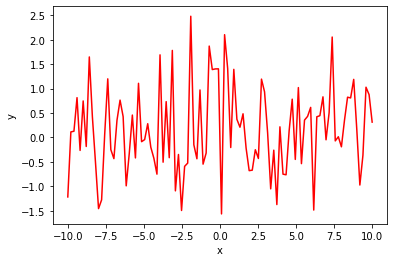
resources